What’s New in Act! v24

March 27, 2022 | Josh Noonan

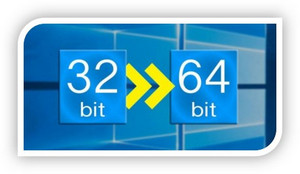
Act! v24 is the first ever 64-bit version, delivering stability & turbocharged performance, while Office integration enhancements bring optimised usability. Ongoing updates, including support for Windows® 11 & the latest major Office 365 release, help you retain compatibility with the latest hardware & software releases.

What’s new in Act! v24

Act! v24 is the first ever 64-bit version, delivering stability & turbocharged performance, while Office integration enhancements bring optimised usability. New marketing automation capabilities also enable greater collaboration and drive dynamic marketing outreach with intelligent follow-up.

Upgrade with confidence to Act! v24 – rigorously vetted for quality & user experience. Ongoing updates, including support for Windows® 11 & the latest major Office 365 release, help you retain compatibility with the latest hardware & software releases.

NEW 64-BIT ARCHITECTURE

Act! v24 capitalizes on the inherent benefits of today’s 64-bit hardware and operating systems – gaining full access to all available system memory for superior speed, performance, and scalability. 

 Why 64-bit? – It’s all about POWER!

  • Memory Access: Access 17,000,000,000+ GB of RAM with a 64-bit native application vs. 4GB with a 32-bit application.
  • Multi-Tasking: Run multiple applications concurrently without system lag or out-of-memory issues.
  • Speed & Performance: Enjoy superior speed during high-load functions and support for large files and data sets.
  • Scalability: Run multiple concurrent 3rd party add-ons optimally and support large or growing implementations.
  • Security: Leverage the inherent security benefits of 64-bit hardware and operating systems.
v24 64 bit 
 
Multi-task, perform high-load functions and support large files and data sets without memory issues via access to virtually unlimited RAM with a 64-bit native application vs. 4GB with a 32-bit application. 
 

 IMPORTANT NOTES (V24):

  • Windows, Web, API, and Office integration drivers are now 64-bit native
  • Requires 64-bit hardware and operating system
  • Act! for Web runs under 64-bit IIS mode, with significantly improved memory management
  • Must reinstall 3rd party add-ons (64-bit compatible only). Customers are encouraged to contact 3rd party developers to confirm 64-compatibility, and whether billable upgrades will be required.


v24 outlook1a 

V24 FOCUS – OUTLOOK ADD-IN

  • UI/UX Enhancements
  • Select from multiple databases quickly and conveniently in the Outlook Add-In and apply toolbar actions (e.g. Quick Attach, Attach to Contact, etc.).
  • New Features & Improvements
  • Attach emails to history for contacts that do not have an email address in Act!, based on matching of data in other fields.
  • Set up API connection to Outlook easily for locally shared hosted databases via the new Preference option.


V24 FOCUS – WORD ADD-IN

  • UI/UX Enhancements
  • Pull in current contact list used during Mail Merge for attaching or recording to history.
  • New Features & Improvements
  • Embed images in MS-word-based Mail Merge templates from image fields on contact records.
  • Resume sending Act! Mail Merge through Outlook due to fix of issue caused by latest MS security update whereas items were going to draft folder.

v24 Outlook10c


V24 FOCUS – COMPATIBILITY UPDATES

Run Act! v24 on Windows® 11 for the latest usability and security enhancements from Microsoft® – set to release in Q4 2021.  Additional compatibility updates include support for Office 2019 and SQL Server 2019. Your Act! subscription ensures ongoing compatibility with current hardware, software, and operating systems for maximum productivity and peace of mind. 

v24 Compat2
  • Windows 11
    • Deploy Act! v24 on Windows 11, releasing October 2021.
    • Reap the benefits of a modern 64-bit platform with the latest security and performance enhancements from Microsoft.
    • Leverage Act! subscription to stay current and compatible with the latest hardware and operating systems.
  • Office 2019
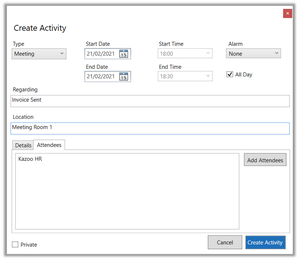
    • Act! v24 uses 64-bit integration for Outlook and Word add-ins, allowing for optimal performance and scalability.
    • Act! Office Add-Ins support 32-bit and 64-bit versions of Office 2019.
  • SQL 2019
    • Deploy pre-packaged SQL 2019 automatically for new installs for maximum performance and convenience.
    • Upgrade to SQL 2019 upon install of Act! v24 if the supported version of SQL is not detected (<SQL 2014 R2)
    • Benefit from the most recent SQL security, performance, and scalability enhancements.
 v24 Outlook10d

V24 FOCUS – Act! MARKETING AUTOMATION

New Features & Enhancements:

  • Capture notes and reminders and collaborate with others on template design with the new Comments feature.
  • Hide individual rows or blocks of content from rendering in mobile emails to optimize optics and readability.
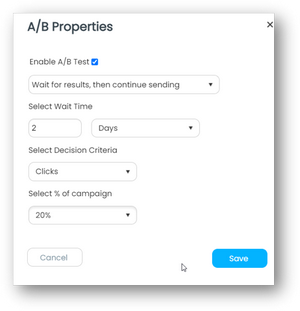
  • Send an A/B email test to subsets of your recipient list, then automatically send the best performing version to the remainder based on the decision criteria you define.
  • Trigger follow-up actions such as calls, meetings, or additional emails based on a score derived from email, landing page, and website engagement by each recipient.
  • Enjoy greater design flexibility with multiple sections and a two-column display on landing page templates.
 

V24 FOCUS – GENERAL IMPROVEMENTS & CHANGES


Quality Improvements & Bug Fixes

  • 150+ Defect Fixes
  • UI Enhancements
  • Updated graphs & charts with modern, 64-bit compatible components in Act! Dashboards.

Feature Deprecation and Changes

  • Legacy Features Removed:
    • Act! Dialer (removed due to lack of modem use amongst current users)
    • Act! Email (antiquated 32-bit email client that was seldom used and uncompetitive with other email clients like Outlook)
    • Smart Tasks (developed in 2011, this feature has fallen into disuse) 
  • Features Changed:
    • Ecommerce connections are now supported by Zapier.

If you are still using an older version of Act!, upgrade and benefit from all the game-changing innovations and modern enhancements that make this next-generation platform the biggest leap in the speed of Act! for over 10 years.

Please note that since 30th November 2021, Act! v21 & prior releases are no longer be eligible for critical security updates, service packs, hotfixes, or compatibility updates – see the Act! Obsolescence Policy. Upgrade to v24 for the peace of mind of a secure & fully supported environment.

The good news is that your Act! subscription includes automatic access to product updates, including Act! v24. Whilst we highly recommend upgrading, we do encourage you to contact your consultant to discuss the upgrade first, especially if you have any customisation, AddOn(s), integration or remote database. Take advantage of your consultant’s vast experience to ensure a smooth & safe upgrade of your own customised Act! solution and any required integration.

Call us on 1300 362 046 (AU) or 0800 443 163 (NZ).


Important Note:
Please be advised that updating to Act! version 24 requires an uninstall of the previous version. We strongly recommend engaging a consultant to assist in the process. Should you decide to update Act! yourself, please refer to this Knowledge Base Article: https://help.act.com/s/article/How-do-I-install-Act-v24-prem.  Act Today provides this software and documentation as a courtesy and accepts no responsibility for self installations. Please note that fees apply for any phone/email support you request if attempting to install the software yourself.

See Plans & Pricing

View System Requirements

DOWNLOAD Act! V24

A final word from Act Today

If this page made you pause and think about how you manage your client relationships, that’s a good start.

Most businesses don’t struggle because they lack effort. They struggle because their systems don’t quite support the way they actually work. That’s where the right CRM setup can make a real difference.

Everything we share about Act! Advantage comes from working with businesses across Australia and New Zealand who want to retain clients, improve communication, and make better decisions from their data.

If you’d like more practical insights about CRM, client retention, and running a smarter client database, you’re welcome to explore the Act Today resources and articles.

And if you’d like to see how Act! Advantage could work in your business, we’d be glad to walk you through it.

14 Day Free Trial
Explore Act! Advantage at your own pace.
28-Day Guided Trial
Work with an Act Today consultant to set up three key CRM functions for your business.

28-Day Guided Trial

Set Up Properly, Decide with Confidence

The 28-day extended trial is designed for businesses that want to experience Act! Advantage working inside their business, not just explore features.

To access the extended trial, you’ll book an initial session with an Act Today consultant based in Australia or New Zealand. During this session, we’ll help you set up three key CRM functions that matter most to your business, such as client follow-ups, communication workflows, retention tracking, or referral visibility.

At the 14-day mark, you’ll have a second check-in with your consultant to answer questions, refine your setup, and remove any roadblocks. This ensures you’re not left guessing and that the system is actually supporting your work.

By the end of the 28 days, you’ll know exactly how Act! Advantage fits your business and whether it delivers real value.

What you’ll get from the 28-day extended trial:

  • Guided setup by a local Act Today CRM consultant
  • Three high-impact CRM functions configured for your business
  • A mid-trial review to answer questions and fine-tune usage
  • A realistic view of outcomes, not just features
  • Confidence to decide based on real experience
START YOUR EXTENDED TRIAL

14-Day Free Trial

Get Hands-On with Act! Advantage CRM

The 14-day free trial gives you full access to Act! Advantage CRM so you can explore how it works in your own time. This is the standard Act! trial used by businesses across Australia and New Zealand who want to see the platform before making a decision.

During the trial, you can add contacts, explore client records, test communication tools, and see how Act! Advantage handles day-to-day client management. It’s a straightforward way to understand how the system is structured and whether it feels right for how you run your business.

This option suits businesses that are comfortable exploring software independently and already have a clear idea of what they want from a CRM. There’s no obligation, no setup required, and no pressure,  just time to assess fit.

What you’ll get from the 14-day free trial:

  • Full access to Act! Advantage CRM features
  • A clear look at how contacts, activities, and communication are managed
  • The ability to test the system across desktop and mobile
  • A simple, no-commitment way to assess fit
  • Confidence before taking the next step
START YOUR TRIAL

Download the FREE Guide

How to Choose the Best CRM for Your Business